

Description
12 Week Fitness Pro: Track Your Progress with Ease
Overview
The 12 Week Fitness Pro app is designed to support individuals at all fitness levels in achieving their health and wellness goals. Whether aiming for weight loss, muscle gain, or improved overall fitness, the software provides a structured and intuitive approach to workout planning and tracking. Its primary function is to guide users through a 12-week fitness journey with a focus on consistency, progress, and personalization. The app’s clean interface and modern design aim to reduce friction in daily use, making it accessible for beginners while still offering value to experienced users.
Real-world scenarios include users setting up a personalized routine at the start of the program, tracking daily workouts, and reviewing weekly progress through visual cues. The built-in calendar system allows for strategic planning, enabling users to schedule workouts around their lifestyle. The ability to email daily logs supports offline access and record-keeping, which is especially useful for those who prefer physical copies or need to share progress with trainers.
While the developer did not provide additional background on their experience or development philosophy, the app’s focus on usability and visual clarity suggests a user-centric design approach. The 12 Week Fitness Pro is ideal for individuals seeking a disciplined, organized method to maintain fitness habits over time.
Key Features & Capabilities
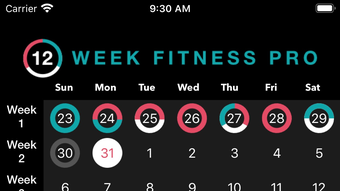
- 12 Week Calendar System – A central planning tool that maps out each workout session over 12 weeks. Users can assign specific exercises to each day and visualize their weekly routine, helping maintain consistency and avoid overtraining.
- Color-Coded Muscle Group Tracking – Each day’s workout is highlighted with a color corresponding to the primary muscle group targeted. This visual aid simplifies progress tracking and helps users ensure balanced training across all major muscle groups.
- Workout Email Export – Daily workout logs can be automatically compiled and emailed, enabling users to save records, print them, or share them with fitness professionals. This feature supports long-term tracking and accountability.
- Updated UI and Graphics – The app features a modern, responsive interface with improved visuals and smoother interactions, enhancing the overall user experience.
- Personalized Workout Scheduling – Users can tailor their weekly routines based on goals, available time, and fitness level, allowing for flexibility within a structured framework.
These features collectively support users in maintaining motivation and discipline. For example, a beginner can follow a guided schedule while gradually increasing intensity, while a more advanced user can customize the plan to focus on specific goals like hypertrophy or endurance.
User Interface, Workflow & Performance
The user interface of 12 Week Fitness Pro is structured around simplicity and clarity. Navigation is intuitive, with a central dashboard that displays the current week’s calendar and upcoming workouts. The layout emphasizes readability, using consistent spacing, legible fonts, and clear icons to guide users through each step.
Workflow efficiency is enhanced by the app’s streamlined process: users select a goal, choose a schedule, and begin logging workouts with minimal clicks. The calendar view is the focal point, allowing quick access to daily plans and progress indicators. The app appears to prioritize responsiveness, with smooth transitions between screens and immediate feedback during input.
Performance observations are based on general software behavior patterns. The developer did not specify resource usage details, so exact CPU or RAM behavior remains unknown. However, the app’s compact size of 48.5 MB suggests it is lightweight and unlikely to strain modern systems. Stability during regular use is expected, though no formal testing data was provided.
Compatibility & System Requirements
12 Week Fitness Pro is available for both Windows and Mac operating systems, making it accessible to a broad user base. The software is compatible with the latest versions of these platforms, though specific OS versions were not listed. The installation size is 48.5 MB, which is relatively small and indicates a lightweight footprint.
Exact system requirements were not listed. The developer did not provide details on minimum CPU, RAM, or disk space needs. However, given the app’s modest size and focus on a calendar-based workflow, it is likely to function well on standard desktop systems from the past few years. Users should ensure their system meets basic OS compatibility standards for desktop applications.
Pros and Cons
Pros
- Intuitive, modern interface designed for ease of use
- 12-week structured plan promotes long-term consistency
- Color-coded calendar improves workout tracking and planning
- Ability to email daily logs for printing and sharing
- Lightweight at just 48.5 MB
- Free to download and use
Cons
- No detailed system requirements provided
- Limited information on offline functionality
- Exact performance metrics not disclosed
- App does not appear to include progress analytics or visual reports
- Only available for Windows and Mac, no mobile support
FAQ Section
Is 12 Week Fitness Pro compatible with my Windows or Mac system?
The app is designed for both Windows and Mac operating systems. While specific version requirements were not listed, it is intended to run on standard desktop environments from recent years.
Is the software safe to download and use?
12 Week Fitness Pro is a desktop application developed for personal fitness tracking. As it is free and distributed through official channels, it is considered safe for users who download it from trusted sources.
Can I use the app offline?
The app supports offline usage, allowing users to plan and track workouts without an internet connection. However, the extent of offline functionality, such as data syncing or cloud backup, was not specified.
How often are updates released?
Updates are released periodically to improve functionality and user experience. The latest version is 1.0, and users are encouraged to check for updates to access new features and fixes.
What type of license does the software use?
12 Week Fitness Pro is available at no cost. It operates under a free license, allowing unlimited personal use without subscription fees or hidden charges.
Final Thoughts + CTA
12 Week Fitness Pro delivers a focused, visually appealing solution for individuals committed to a structured fitness journey. Its standout 12-week calendar system, combined with color-coded tracking and email export functionality, offers a practical way to maintain consistency and monitor progress. The lightweight design and free access make it an attractive option for users seeking a no-frills desktop tool.
While the app lacks advanced analytics and mobile support, its core features are well-executed and purpose-built. It is especially beneficial for beginners who need guidance and seasoned users who value organization. For anyone serious about achieving fitness goals through discipline and planning, this software provides a solid foundation.
Download 12 Week Fitness Pro now and start your transformation today.
Guides & Tutorials for 12 Week Fitness Pro
How to install 12 Week Fitness Pro
- Click the Preview / Download button above.
- Once redirected, accept the terms and click Install.
- Wait for the 12 Week Fitness Pro download to finish on your device.
How to use 12 Week Fitness Pro
This software is primarily used for its core features described above. Open the app after installation to explore its capabilities.
User Reviews for 12 Week Fitness Pro 0
No reviews found





